
Linux Full Tutorial -- Part 4: Text Processing Tools
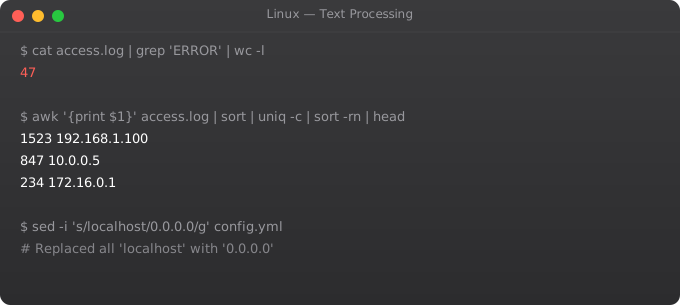
Linux text processing tools are among the most powerful in the operating system. grep, awk, and sed -- often called the "DevOps trio" -- let you search, extract, and transform text at any scale. Understanding them fluently means you can analyse log files, transform data, and automate text manipulation without writing Python scripts for every task.
grep -- Pattern Search
grep "ERROR" app.log               # Lines containing ERROR
grep -i "error" app.log            # Case-insensitive
grep -v "DEBUG" app.log            # Lines NOT matching
grep -r "TODO" ./src/              # Recursive search
grep -l "password" /etc/           # Only show filenames
grep -n "ERROR" app.log            # Show line numbers
grep -c "ERROR" app.log            # Count matching lines
grep -A 3 "FATAL" app.log          # 3 lines after match
grep -B 2 "FATAL" app.log          # 2 lines before match
grep -E "error|warning" app.log    # Extended regex (or)
grep "^ERROR" app.log              # Lines starting with ERROR
grep "Error$" app.log              # Lines ending with Error
awk -- Column Processing
awk "{print $1}" file.txt          # Print first column
awk "{print $1, $3}" file.txt      # Print columns 1 and 3
awk -F: "{print $1}" /etc/passwd   # : as separator -- print usernames
awk "$3 > 1000" /etc/passwd        # Rows where column 3 > 1000
awk "NR > 5" file.txt              # Skip first 5 lines
awk "NR==1,NR==10" file.txt        # Lines 1-10

# Process nginx access log -- show IPs and paths
awk "{print $1, $7}" /var/log/nginx/access.log

# Sum a column
awk "{sum += $3} END {print sum}" file.txt

# Count occurrences
awk "{count[$1]++} END {for(k in count) print k, count[k]}" log.txt
sed -- Stream Editor
sed "s/old/new/" file.txt           # Replace first occurrence per line
sed "s/old/new/g" file.txt          # Replace all occurrences
sed "s/old/new/gi" file.txt         # Case-insensitive replace all
sed -i "s/DEBUG/INFO/g" app.conf    # Edit file IN PLACE
sed -n "5,15p" file.txt             # Print lines 5-15 only
sed "/^#/d" config.txt              # Delete comment lines
sed "1d" file.txt                   # Delete first line
sed "$ d" file.txt                  # Delete last line

# Real-world example: update config value
sed -i "s/max_connections = .*/max_connections = 200/" /etc/postgresql.conf
Pipes -- Chain Commands Together
# Count unique IPs in nginx log
awk "{print $1}" /var/log/nginx/access.log | sort | uniq -c | sort -rn | head -20

# Find top error types in log
grep "ERROR" app.log | awk "{print $4}" | sort | uniq -c | sort -rn

# Extract and sort unique domains from email list
awk -F@ "{print $2}" emails.txt | sort -u

# Count lines per file in a directory
for f in *.txt; do echo "$f: $(wc -l < $f) lines"; done

# Find and kill process by name
ps aux | grep nginx | grep -v grep | awk "{print $2}" | xargs kill
Other Text Tools
sort file.txt                  # Sort alphabetically
sort -n numbers.txt            # Numeric sort
sort -rn numbers.txt           # Reverse numeric sort
sort -u file.txt               # Sort and remove duplicates
uniq file.txt                  # Remove consecutive duplicates
uniq -c file.txt               # Count occurrences
cut -d: -f1 /etc/passwd        # Cut column 1 with : delimiter
cut -c1-10 file.txt            # Cut characters 1-10
tr "a-z" "A-Z" < file.txt     # Translate lowercase to uppercase
tr -d "\r" < file.txt         # Remove Windows line endings
Frequently Asked Questions
When should I use grep vs awk vs sed?
grep for finding lines matching a pattern. awk for processing columns and performing calculations on structured text. sed for find-and-replace and deleting/printing specific lines. Often combine all three with pipes.
How do I search for text in multiple files?
grep -r "pattern" /path/ searches recursively. grep -l "pattern" *.txt shows only filenames. grep -rn "pattern" /etc/ shows filenames and line numbers. For very large numbers of files, use: find . -type f -exec grep -l "pattern" {} +
How do I do a dry run of sed before editing files?
Omit the -i flag: sed "s/old/new/g" file.txt shows output without modifying. When satisfied, add -i for in-place edit. On macOS, sed -i requires an empty string extension: sed -i "" "s/old/new/g" file.txt
What is the difference between sort and sort -u vs uniq?
sort -u sorts and removes duplicates in one step. uniq only removes consecutive duplicates -- must sort first for complete deduplication: sort file.txt | uniq. uniq -c is useful to count occurrences after sorting.
How do I extract a specific column from a CSV file?
cut -d, -f2 file.csv extracts the 2nd column. awk -F, "{print $2}" file.csv does the same with more flexibility (can print multiple columns, add conditions). For complex CSVs with quoted fields, use python csv module or csvkit.
In Part 5, we cover process management -- monitoring, controlling, and managing running programs in Linux.
Key takeaways
- You don't need to memorise 500 commands. Master 30 — `ls`, `cd`, `pwd`, `cp`, `mv`, `rm`, `cat`, `less`, `head`, `tail`, `grep`, `find`, `chmod`, `chown`, `ps`, `kill`, `top`, `df`, `du`, `tar`, `wc`, `sort`, `uniq`, `awk`, `sed`, `xargs`, `cut`, `tr`, `echo`, `man` — and you'll handle 90% of daily work.
- Pipes (`|`) chain commands. Output of one becomes input of the next. This is where Linux's power compounds.
- Learn `grep -r` (recursive), `find` with `-exec`, and `xargs`. These three patterns solve most "find files and do X" tasks.
- Read the `man` pages. They look intimidating but they're the actual source of truth, not Stack Overflow snippets.
Real Log Analysis Workflows
# nginx log format:
# 10.0.1.5 - - [01/Jan/2026:12:00:00] "GET /api/users HTTP/1.1" 200 1234 "..." "..."
LOG="/var/log/nginx/access.log"

# Top 10 IPs by request count
awk '{print $1}' $LOG | sort | uniq -c | sort -rn | head -10

# 5xx errors in last hour
awk '$9 >= 500' $LOG | wc -l

# Response time analysis (if included in log format)
awk '{print $NF}' $LOG | sort -n | awk '
  BEGIN {count=0; sum=0}
  {count++; sum+=$1; arr[count]=$1}
  END {
    print "Count:", count
    print "Mean:", sum/count
    print "P50:", arr[int(count*0.5)]
    print "P95:", arr[int(count*0.95)]
    print "P99:", arr[int(count*0.99)]
  }'

# Find all 404 URLs and count them
awk '$9 == 404 {print $7}' $LOG | sort | uniq -c | sort -rn | head -20

# Requests per minute (traffic pattern)
awk '{print $4}' $LOG | cut -d: -f1,2,3 | uniq -c
jq for JSON Processing
sudo apt install jq

# Pretty print JSON
echo '{"name":"suraj","age":25}' | jq .

# Extract field
aws ec2 describe-instances | jq '.Reservations[].Instances[].InstanceId'

# Filter array
aws ec2 describe-instances | jq '.Reservations[].Instances[] | select(.State.Name == "running")'

# Combine fields
aws ec2 describe-instances | jq '.Reservations[].Instances[] | {id: .InstanceId, ip: .PublicIpAddress, state: .State.Name}'

# Count results
aws s3api list-objects --bucket my-bucket | jq '.Contents | length'