
Linux Full Tutorial -- Part 3: File Permissions
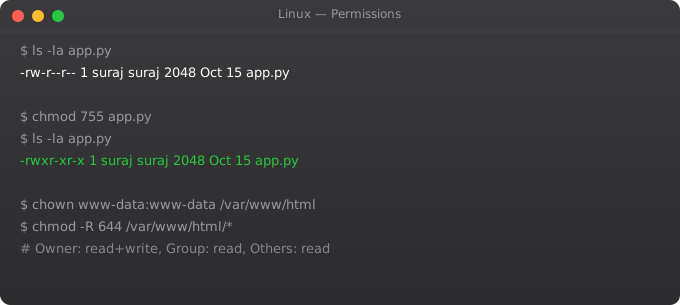
Linux permission system controls who can read, write, and execute every file and directory on the system. Understanding it is essential -- incorrect permissions are a major source of security vulnerabilities and operational problems. Applications fail because they cannot write logs. Web servers cannot serve files. SSH breaks because key files have wrong permissions.
Permission Structure
ls -la
# -rw-r--r-- 1 suraj devs  1234 Jan 1 myfile.txt
# drwxr-xr-x 2 root  root  4096 Jan 1 scripts/
# ||||||||||    ^^^^^  ^^^^
# ||||||||||    user   group
# |||||||||+-- other: r--
# ||||||+--- group: r-x
# |||+--- user: rw-
# |+-- type: - file, d directory, l symlink
# r=4 w=2 x=1
chmod
chmod 755 script.sh    # rwxr-xr-x
chmod 644 config.txt   # rw-r--r--
chmod 600 .ssh/id_rsa  # rw------- (SSH key must be this!)
chmod 700 .ssh/        # rwx------
chmod +x deploy.sh     # Add execute for all
chmod -w file.txt      # Remove write from all
chmod u+x,g-w file     # Add user execute, remove group write
chmod -R 755 /app/     # Recursive: all files and directories
chown and chgrp
chown ubuntu file.txt             # Change owner
chown ubuntu:devs file.txt        # Change owner and group
chown -R www-data:www-data /var/www/html/  # Recursive
chgrp developers project/         # Change group only
Special Permissions
# SUID (Set User ID) -- run as owner, not caller
chmod u+s /usr/bin/passwd
ls -l /usr/bin/passwd  # -rwsr-xr-x (s = SUID)

# SGID on directory -- new files inherit group
chmod g+s /shared/

# Sticky bit -- only owner can delete
chmod +t /tmp/
ls -la / | grep tmp  # drwxrwxrwt (t = sticky bit)

# Numeric: 4=SUID 2=SGID 1=sticky
chmod 4755 file     # SUID + 755
umask
umask           # Show current umask (typically 022)
# umask 022 means:
# Files:       666 - 022 = 644 (rw-r--r--)
# Directories: 777 - 022 = 755 (rwxr-xr-x)

umask 027       # More restrictive: files 640, dirs 750
# Add to ~/.bashrc to make permanent
Frequently Asked Questions
What permissions should SSH keys have?
600 for private key files (~/.ssh/id_rsa). 644 for public key files. 700 for ~/.ssh/ directory. 600 for ~/.ssh/authorized_keys. SSH will refuse to connect if private keys are too permissive.
What permissions should a web server need?
/var/www/html/ should be owned by www-data:www-data (the nginx/apache user). Files: 644, directories: 755. PHP should be owned by the web server user. Never use 777 on a production server.
What does chmod 777 mean and why avoid it?
777 = rwxrwxrwx -- everyone can read, write, and execute. Avoid in production because it lets any user on the system (or any compromised process) modify the file. Use minimal permissions -- only what is needed.
How do I find files with wrong permissions?
find /home -perm 777 -- find world-writable files. find / -perm -4000 -- find SUID files. find /var/www -not -user www-data -- find files with wrong owner.
What is the principle of least privilege?
Give users and processes only the minimum permissions they need to function. A web server should not be able to write to /etc/. An application user should not have sudo access. This limits damage if a component is compromised.
In Part 4, we cover text processing with grep, awk, and sed -- essential tools for working with log files and configuration in Linux.
Key takeaways
- Everything in Linux is a file — even processes, devices, and network sockets. That's not a metaphor; it's the design.
- `/` is root. `/home` is users. `/etc` is config. `/var/log` is logs. `/proc` and `/sys` are kernel interfaces, not real disk.
- FHS (Filesystem Hierarchy Standard) is mostly followed but distributions diverge. Spend 10 minutes per directory understanding what lives there.
- When you don't know where something is, `which`, `whereis`, and `find / -name` are your friends.
Permission Scenarios in Production
# Web application directory structure
sudo mkdir -p /var/www/myapp/{html,logs,uploads}

# Nginx runs as www-data, app runs as appuser
sudo chown -R www-data:www-data /var/www/myapp/html
sudo chown -R appuser:appuser   /var/www/myapp/logs
sudo chown -R appuser:www-data  /var/www/myapp/uploads

# Permissions:
# html:    755 (nginx can read, world cannot write)
# logs:    755 (app writes, nginx can read)
# uploads: 2775 (SGID set -- new files inherit group www-data)

find /var/www/myapp/html -type d -exec chmod 755 {} \;
find /var/www/myapp/html -type f -exec chmod 644 {} \;
chmod 2775 /var/www/myapp/uploads
Access Control Lists (ACL)
# Standard permissions: one owner, one group, everyone else
# ACL: per-user and per-group permissions on any file

# Install ACL tools
sudo apt install acl

# Grant user john read access to a file (even if not in group)
setfacl -m u:john:r /etc/nginx/nginx.conf

# Grant group developers read+write access to directory
setfacl -m g:developers:rw /srv/shared/

# Set default ACL (applies to new files in directory)
setfacl -m d:g:developers:rw /srv/shared/

# View ACL
getfacl /srv/shared/

# Remove ACL
setfacl -x u:john /etc/nginx/nginx.conf
Auditing File Access with auditd
sudo apt install auditd

# Watch a sensitive file for any access
sudo auditctl -w /etc/passwd -p rwxa -k passwd-access

# Watch a directory for writes
sudo auditctl -w /var/www/html -p w -k web-writes

# View audit log
sudo aureport --file
sudo ausearch -k passwd-access --start today
sudo ausearch -f /etc/passwd
Understanding umask in Production
umask             # Show current (usually 0022)
# umask 022 means:
# Files created:       666 - 022 = 644 (rw-r--r--)
# Directories created: 777 - 022 = 755 (rwxr-xr-x)

# More restrictive for sensitive directories
umask 027
# Files: 640 (rw-r-----) -- owner read+write, group read, others nothing
# Dirs:  750 (rwxr-x---) -- owner full, group read+exec, others nothing

# Set per-user in ~/.bashrc:
echo "umask 027" >> ~/.bashrc

# Set system-wide in /etc/profile or /etc/login.defs:
echo "umask 027" | sudo tee -a /etc/profile
Find Files by Permission (Security Audit)
# Find world-writable files (security risk)
find /var/www -perm -o+w -type f 2>/dev/null

# Find SUID binaries (can run as owner, not caller)
find / -perm -4000 -type f 2>/dev/null
# Known safe: /usr/bin/passwd, /usr/bin/sudo, /usr/bin/su

# Find SGID files
find / -perm -2000 -type f 2>/dev/null

# Find files not owned by any user (orphaned)
find / -nouser -type f 2>/dev/null

# Find files modified in last 24 hours (incident response)
find /etc -mtime -1 -type f 2>/dev/null
find /usr/bin -mtime -1 -type f 2>/dev/null

# Fix all files in a web directory at once
find /var/www/html -type f -exec chmod 644 {} \;
find /var/www/html -type d -exec chmod 755 {} \;