
Linux Full Tutorial -- Part 5: Process Management
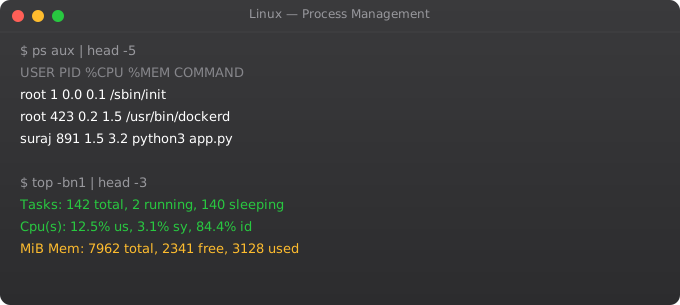
Every running program in Linux is a process. Managing processes -- understanding what is running, how much resources each uses, how to control them, and how to make services start automatically -- is core Linux sysadmin and DevOps work. This part covers everything from the ps command to systemd service management.
Viewing Processes
ps aux                    # All processes with details
ps aux | grep nginx       # Find nginx processes
ps -ef                    # All processes, full format
pgrep nginx               # Get PID(s) of nginx

top                       # Live process monitor
# In top: q=quit k=kill r=renice Shift+M=sort by memory

htop                      # Better top (install first: apt install htop)
# In htop: F3=search F4=filter F9=kill F10=quit

watch -n 2 "ps aux | grep myapp"  # Repeat command every 2 seconds
Killing Processes
kill 1234               # SIGTERM (15) -- graceful shutdown
kill -9 1234            # SIGKILL -- force kill (cannot be caught)
kill -HUP 1234          # SIGHUP -- reload config
pkill nginx             # Kill by name
pkill -f "python app.py"  # Kill by full command
killall python3         # Kill all processes named python3

# Find and kill process using a port
lsof -i :8080
fuser -k 8080/tcp       # Kill process using TCP port 8080
Background Processes
./script.sh &            # Run in background
nohup ./script.sh &      # Immune to hangup (survives SSH disconnect)
screen -S mysession      # Create a named screen session
screen -r mysession      # Resume session
tmux new -s work         # Create tmux session
tmux attach -t work      # Attach to session

jobs                     # List background jobs in current shell
bg 1                     # Resume job 1 in background
fg 1                     # Bring job 1 to foreground
Ctrl+Z                   # Suspend current process
systemd Service Management
systemctl status nginx             # Check service status
systemctl start nginx              # Start service
systemctl stop nginx               # Stop service
systemctl restart nginx            # Stop and start
systemctl reload nginx             # Reload config (no downtime)
systemctl enable nginx             # Start on boot
systemctl disable nginx            # Do not start on boot
systemctl is-active nginx          # Is it running?
systemctl list-units --type=service  # All services

# View service logs
journalctl -u nginx                # All logs for nginx
journalctl -u nginx --since "1 hour ago"  # Recent logs
journalctl -f -u nginx             # Follow live logs
Creating a systemd Service
[Unit]
Description=My Python Application
After=network.target
Wants=network.target

[Service]
Type=simple
User=ubuntu
WorkingDirectory=/home/ubuntu/myapp
ExecStart=/home/ubuntu/myapp/venv/bin/python app.py
Restart=always
RestartSec=5
Environment=PORT=8000
Environment=LOG_LEVEL=INFO

[Install]
WantedBy=multi-user.target

# After creating the file:
systemctl daemon-reload
systemctl enable myapp
systemctl start myapp
Frequently Asked Questions
What is the difference between kill and kill -9?
kill sends SIGTERM (15) -- asks the process to terminate gracefully, allowing cleanup. kill -9 sends SIGKILL -- the kernel immediately terminates the process with no cleanup. Always try SIGTERM first. Use SIGKILL only when the process does not respond.
What is a zombie process?
A zombie process has finished execution but its entry still exists in the process table because its parent has not acknowledged its exit. Zombies consume minimal resources but indicate a programming error in the parent process. Kill the parent to clean up zombies.
What is the difference between service and systemctl?
service is an older wrapper that calls init scripts. systemctl is the modern interface for systemd. On modern Ubuntu/Debian systems, systemctl is preferred. service nginx restart is equivalent to systemctl restart nginx on systemd systems.
How do I see what processes use the most CPU/memory?
top sorted by CPU by default. Press M in top to sort by memory. htop provides a better visual. ps aux --sort=-%cpu | head -10 for top CPU users. ps aux --sort=-%mem | head -10 for memory.
What is a daemon process?
A daemon is a background process that runs continuously, usually started at boot, providing a service. Web servers (nginx), databases (postgresql), SSH (sshd) are all daemons. systemd manages daemons on modern Linux systems.
In Part 6, we cover Linux networking commands for configuring and debugging network connectivity.
Key takeaways
- File permissions are user/group/other × read/write/execute. The number `755` means owner has rwx, others have rx. Get fluent in this — it's daily reading.
- `chmod` changes permissions, `chown` changes ownership. Be precise with both — sweeping changes break things subtly.
- Setuid (`s` bit) lets a binary run as its owner instead of the user. Powerful, but a classic security footgun. Audit binaries with setuid regularly.
- ACLs (`getfacl`, `setfacl`) exist for when basic permissions aren't enough — but if you're reaching for them often, your design is probably wrong.
Linux OOM Killer and Memory Management
# OOM (Out Of Memory) killer: Linux kills processes when RAM is exhausted
# Check if OOM killer has run recently
dmesg | grep -i "oom\|killed process"
grep "Out of memory" /var/log/syslog | tail -10

# See OOM score of processes (higher = more likely to be killed)
cat /proc/$(pgrep nginx)/oom_score
cat /proc/$(pgrep postgres)/oom_score

# Protect critical processes from OOM killer
echo -1000 | sudo tee /proc/$(pgrep nginx)/oom_score_adj   # Never kill
echo 500  | sudo tee /proc/$(pgrep chrome)/oom_score_adj   # Kill this first

# Memory usage by process
ps aux --sort=-%mem | head -10
cat /proc/meminfo              # Detailed memory information
ulimit: Resource Limits Per Process
ulimit -a                     # Show all limits for current shell

# Common limits
ulimit -n 65536               # Open files limit (critical for web servers)
ulimit -u 4096                # Max processes
ulimit -m 1048576             # Max memory (KB)

# Permanent limits: /etc/security/limits.conf
*    soft nofile 65536
*    hard nofile 65536
nginx soft nofile 131072
nginx hard nofile 131072

# Per-service in systemd:
# [Service]
# LimitNOFILE=65536
# LimitNPROC=4096
strace: Tracing System Calls
# Trace a command
strace ls /tmp 2>&1 | head -30

# Trace a running process
strace -p 1234

# Only show file-related calls
strace -e trace=file ls /tmp

# Trace with timestamps
strace -t ls /tmp

# Find why a process is slow (show time per syscall)
strace -c -p 1234           # Summary after Ctrl+C

# Find what files a process is reading
strace -e openat ls /tmp 2>&1 | grep "openat"