
AWS Linux Tutorial -- Part 10: VPC, Networking & Security Groups
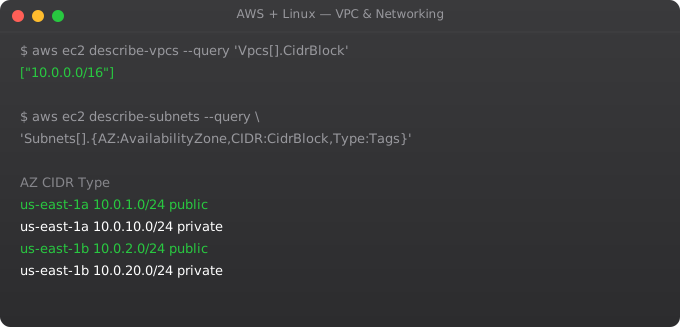
A VPC (Virtual Private Cloud) is your private isolated section of the AWS cloud. Understanding VPC networking is essential for any cloud engineer -- it determines who can reach your resources, how your services communicate, and how you isolate production from development. Every AWS resource you launch lives in a VPC.
VPC Components
VPC:           Your private network space (e.g. 10.0.0.0/16)
Subnet:        Segment of VPC in one AZ (e.g. 10.0.1.0/24)
Route Table:   Rules for where traffic is directed
Internet GW:   Connects public subnets to internet
NAT Gateway:   Lets private subnets reach internet (outbound only)
Security Group: Virtual firewall for instances (stateful)
NACL:          Firewall at subnet level (stateless)
Elastic IP:    Static public IP address
Standard VPC Architecture
VPC: 10.0.0.0/16

Public Subnets (two AZs for HA):
  10.0.1.0/24 (ap-south-1a)  -- Load balancer, NAT Gateway
  10.0.2.0/24 (ap-south-1b)  -- Load balancer

Private App Subnets:
  10.0.10.0/24 (ap-south-1a) -- EC2 application servers
  10.0.11.0/24 (ap-south-1b) -- EC2 application servers

Private DB Subnets:
  10.0.20.0/24 (ap-south-1a) -- RDS primary
  10.0.21.0/24 (ap-south-1b) -- RDS standby

# Public subnets: route 0.0.0.0/0 -> Internet Gateway
# Private subnets: route 0.0.0.0/0 -> NAT Gateway
Security Groups Best Practices
# ALB Security Group (internet-facing)
Inbound:  HTTP 80 from 0.0.0.0/0
Inbound:  HTTPS 443 from 0.0.0.0/0
Outbound: All to App-SG

# App Security Group (EC2 instances)
Inbound:  Port 8000 from ALB-SG (not from internet!)
Inbound:  SSH 22 from Bastion-SG only
Outbound: PostgreSQL 5432 to DB-SG
Outbound: HTTPS 443 to 0.0.0.0/0 (for external APIs)

# DB Security Group (RDS)
Inbound:  PostgreSQL 5432 from App-SG only
Outbound: (nothing needed)

# Bastion Security Group
Inbound:  SSH 22 from your IP only
Outbound: SSH 22 to App-SG
Frequently Asked Questions
What is the difference between a public and private subnet?
Public subnet: has a route to an Internet Gateway. Resources can have public IPs and be reached from internet. Private subnet: no direct route to internet. Resources can only be reached from within the VPC. Use private subnets for databases, application servers, and anything that should not be internet-accessible.
What is a NAT Gateway and do I need one?
NAT Gateway allows resources in private subnets to initiate outbound connections to the internet (software updates, external API calls) without being reachable from the internet. Costs ~$0.045/hr + data transfer. If private instances need no internet access, you can skip it.
What is the difference between security groups and NACLs?
Security groups are stateful -- return traffic is allowed automatically. They operate at the instance level. NACLs are stateless -- you must explicitly allow both inbound and outbound. They operate at the subnet level. Use security groups for most access control, NACLs as an additional subnet-level barrier.
How do I connect to private instances?
Use a bastion host in a public subnet as a jump server. Or use AWS Session Manager (no bastion needed, no SSH ports to open). Session Manager is the modern approach: Systems Manager > Session Manager > Start session.
How do I peer two VPCs together?
Create a VPC peering connection. Add routes in both VPCs: route to peer CIDR via the peering connection. Update security groups to allow traffic from peer CIDR. VPC peering is free for traffic in the same region. Cross-region peering has data transfer costs.
In Part 11, we set up CloudWatch monitoring -- metrics, logs, alarms, and dashboards for your AWS infrastructure.
Key takeaways
- The #1 way to save money: turn off what you're not using. Dev environments overnight. Old EBS snapshots. Idle ELBs. AWS bills for what's running, not what you use.
- Reserved Instances and Savings Plans for steady workloads (1-year terms typically pay off). Spot for fault-tolerant. On-demand for unpredictable.
- Use AWS Cost Explorer and set budgets/alarms. "I'll watch the bill manually" doesn't survive contact with reality.
- Right-sizing tools (Compute Optimizer) catch over-provisioned instances. Run them quarterly — usage patterns drift.
VPC Endpoints: Access AWS Services Privately
# VPC Endpoints let private instances reach AWS services
# without going through Internet Gateway or NAT Gateway
# Saves cost (no NAT Gateway charges) and improves security

# S3 Gateway Endpoint (free)
aws ec2 create-vpc-endpoint   --vpc-id vpc-12345   --service-name com.amazonaws.ap-south-1.s3   --route-table-ids rtb-12345

# EC2 instances in private subnet can now reach S3:
aws s3 ls  # Works without Internet access!

# Interface Endpoints for other services (hourly cost)
aws ec2 create-vpc-endpoint   --vpc-id vpc-12345   --vpc-endpoint-type Interface   --service-name com.amazonaws.ap-south-1.secretsmanager   --subnet-ids subnet-private1 subnet-private2   --security-group-ids sg-endpoints
Flow Logs for Network Debugging
# Enable VPC Flow Logs
aws ec2 create-flow-logs   --resource-type VPC   --resource-ids vpc-12345   --traffic-type ALL   --log-destination-type cloud-watch-logs   --log-destination "arn:aws:logs:ap-south-1:123456789:log-group:vpc-flow-logs"   --deliver-logs-permission-arn "arn:aws:iam::123456789:role/flow-logs-role"

# Query flow logs with CloudWatch Insights
# "Why can my EC2 not reach the database?"
fields @timestamp, srcAddr, dstAddr, dstPort, action
| filter dstPort = 5432 and action = "REJECT"
| sort @timestamp desc
| limit 20

# Rejected traffic shows firewall/NACL/security group blocks
Transit Gateway for Multi-VPC Connectivity
# Problem: 10 VPCs need to talk to each other
# VPC peering requires N*(N-1)/2 connections (45 for 10 VPCs)
# Transit Gateway: one hub, all VPCs connect to it (10 connections)

aws ec2 create-transit-gateway   --description "Central hub for all VPCs"   --options AmazonSideAsn=64512,AutoAcceptSharedAttachments=enable

# Attach each VPC to Transit Gateway
aws ec2 create-transit-gateway-vpc-attachment   --transit-gateway-id tgw-12345   --vpc-id vpc-prod   --subnet-ids subnet-prod-a subnet-prod-b

# Add route in each VPC route table pointing to Transit Gateway
aws ec2 create-route   --route-table-id rtb-prod   --destination-cidr-block 10.0.0.0/8   --transit-gateway-id tgw-12345