
Kubernetes Tutorial — Part 9: Health Checks, Probes, and Reliability
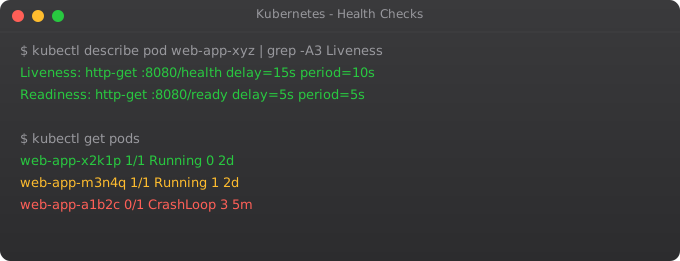
There is a subtle but critical problem with Kubernetes that beginners often discover the hard way in production. When you do a rolling update, Kubernetes starts a new pod and, after a few seconds, considers it "running" and starts sending it traffic. But "running" just means the container process started — it does not mean the application inside is actually ready to handle requests. If your Node.js app takes 15 seconds to warm up, those first 15 seconds of traffic will get 502 errors.
I encountered this exact problem at a company I worked with. Their deployment pipeline would mark a release as successful, but for the first 20 seconds after every deploy, users were seeing errors. Nobody could figure out why for weeks. The answer was simple: no readiness probes. Kubernetes was routing traffic to pods that were still starting up.
Kubernetes has three types of probes that solve this completely: liveness, readiness, and startup. Together they give you fine-grained control over when pods receive traffic and when they get restarted.
The Three Probe Types
A liveness probe answers the question: "Is this container alive and running correctly?" If it fails, Kubernetes restarts the container. Use it to detect deadlocks or corrupted state that requires a restart to fix.
A readiness probe answers: "Is this container ready to receive traffic?" If it fails, Kubernetes removes the pod from the Service endpoints — traffic stops going to it, but the container is not restarted. Use it during startup and for temporary unavailability (like when a background job is consuming all resources).
A startup probe answers: "Has this container finished its initial startup?" While the startup probe is running, liveness and readiness probes are disabled. This prevents premature killing of slow-starting legacy applications.
Three Probe Mechanisms
Each probe type can use one of three checking mechanisms.
HTTP GET — Kubernetes sends an HTTP GET request to the specified path and port. If the response code is 200–399, the probe passes. This is the most common mechanism for web applications.
TCP Socket — Kubernetes tries to open a TCP connection to the specified port. If the connection succeeds, the probe passes. Good for databases or services that do not have HTTP endpoints.
Exec — Kubernetes runs a command inside the container. If the exit code is 0, the probe passes. Most flexible but most resource-intensive.
Configuring a Readiness Probe (HTTP)
apiVersion: apps/v1
kind: Deployment
metadata:
  name: web-app
spec:
  replicas: 3
  selector:
    matchLabels:
      app: web-app
  template:
    metadata:
      labels:
        app: web-app
    spec:
      containers:
      - name: web-app
        image: web-app:2.0
        ports:
        - containerPort: 8080
        readinessProbe:
          httpGet:
            path: /health/ready
            port: 8080
          initialDelaySeconds: 10   # Wait 10s before first probe
          periodSeconds: 5          # Check every 5 seconds
          timeoutSeconds: 3         # Fail if no response in 3s
          failureThreshold: 3       # Fail 3 times before marking not ready
successThreshold: 1 # 1 success needed to mark ready againkubectl apply -f deployment-with-readiness.yaml
# Watch pods — they will show 0/1 READY until the probe passes
kubectl get pods -w
# See probe events in pod description
kubectl describe pod web-app-xxxxx | grep -A 20 "Conditions\|Events"Adding a Liveness Probe
        livenessProbe:
          httpGet:
            path: /health/live
            port: 8080
          initialDelaySeconds: 30    # Give app 30s to fully start
          periodSeconds: 10          # Check every 10 seconds
          timeoutSeconds: 5
          failureThreshold: 3        # Restart after 3 consecutive failures
The key thing about liveness probes is setting initialDelaySeconds correctly. If your app takes 20 seconds to start and you set initialDelaySeconds: 5, the liveness probe will fire while the app is still starting, fail, and cause an infinite restart loop. This is the most common liveness probe mistake. When in doubt, set a higher initial delay.
Startup Probe for Slow Applications
        startupProbe:
          httpGet:
            path: /health/live
            port: 8080
          failureThreshold: 30      # Give up to 30 * 10s = 5 minutes to start
          periodSeconds: 10
        livenessProbe:
          httpGet:
            path: /health/live
            port: 8080
          periodSeconds: 10
          failureThreshold: 3
        readinessProbe:
          httpGet:
            path: /health/ready
            port: 8080
          periodSeconds: 5
          failureThreshold: 3
With this configuration, Kubernetes gives the app up to 5 minutes (30 attempts × 10 seconds) to start up. Once the startup probe succeeds once, it disables itself and hands over to the liveness and readiness probes for ongoing monitoring.
TCP and Exec Probe Examples
        readinessProbe:
          tcpSocket:
            port: 5432
          initialDelaySeconds: 15
periodSeconds: 10 livenessProbe:
exec:
command:
- /bin/sh
- -c
- "redis-cli ping | grep -q PONG"
initialDelaySeconds: 30
periodSeconds: 10Pod Disruption Budgets — Protecting Availability During Updates
Even with perfect probes, rolling updates can temporarily reduce availability. A PodDisruptionBudget (PDB) tells Kubernetes the minimum number of pods that must always be available, even during voluntary disruptions like rolling updates or node drains.
apiVersion: policy/v1
kind: PodDisruptionBudget
metadata:
  name: web-app-pdb
spec:
  minAvailable: 2    # Always keep at least 2 pods running
  selector:
    matchLabels:
app: web-app# Check pod readiness status
kubectl get pods
# See probe failure events
kubectl describe pod POD_NAME | grep -i probe
# Watch restart counts (high restarts = liveness probe issues)
kubectl get pods -o wide
# Check events across the namespace
kubectl get events --sort-by=.lastTimestampWhat is Next
Your pods are now reliable — they only receive traffic when ready, and they self-heal when they become unhealthy. In Part 10, we tackle Helm — the package manager for Kubernetes. Instead of managing dozens of YAML files manually, Helm lets you deploy entire applications from versioned, configurable charts. It also enables repeatable deployments across multiple environments with simple configuration overrides.
Frequently Asked Questions
What is the difference between liveness and readiness probes?
Liveness: is the container alive? Failure restarts it. Readiness: is the container ready for traffic? Failure removes it from the Service load balancer but does not restart it. Use both — liveness for crash detection, readiness for startup and temporary unavailability.
What is a startup probe?
A startup probe gives slow-starting applications time to initialise. While it runs, liveness and readiness probes are disabled, preventing premature restarts of legitimately slow-starting containers like legacy Java apps.
What happens when a liveness probe fails?
After consecutive failures exceeding failureThreshold, Kubernetes kills and restarts the container. The pod stays on the same node; only the container restarts. The restart count increases, visible via kubectl describe pod.
What are the three probe mechanisms?
HTTP GET (checks HTTP response code), TCP Socket (checks if port is open), and Exec (runs a command, checks exit code 0). HTTP GET is most common for web apps. TCP Socket works for databases. Exec is most flexible.
How do I configure probe timing?
Set initialDelaySeconds (wait before first probe), periodSeconds (probe frequency), timeoutSeconds (response deadline), failureThreshold (failures before action), and successThreshold (successes needed to pass). Always set initialDelaySeconds generously to avoid restart loops during startup.
Key takeaways
- Always set resource `requests` and `limits` on every container. Without requests, the scheduler can't make good decisions. Without limits, one bad pod takes down the node.
- HPA (Horizontal Pod Autoscaler) scales pod count based on CPU/memory/custom metrics. VPA changes resource requests for you (use carefully).
- Cluster Autoscaler scales the underlying nodes. HPA + Cluster Autoscaler together = the elasticity people expect from "cloud-native".
- Don't autoscale on CPU alone for I/O-bound apps. Use custom metrics (queue depth, request rate) — that's where Keda shines.