
Kubernetes Tutorial — Part 12: Production Deployment — Putting It All Together
We have covered a lot of ground in this series. Deployments, Services, ConfigMaps, Secrets, Volumes, Namespaces, Ingress, Health Probes, Helm, and Monitoring. Each concept was isolated — you learned it, practiced it, moved on. But production does not work that way. Production is all of it, running together, needing to be reliable under real traffic with real users who notice when things break.
This final part brings everything together. We are going to deploy a complete production-grade web application: a Node.js API backed by PostgreSQL, exposed via Ingress with HTTPS, fully observable with Prometheus metrics, automatically scaling with HPA, and packaged as a Helm chart so the entire deployment is one command. This is the pattern you will use in real jobs.
I remember the first time I deployed something like this properly at work. Not just "running in Kubernetes" but genuinely production-grade — with probes, resource limits, monitoring, the works. The difference in reliability between a properly configured Kubernetes deployment and a casual one is enormous. Let us build the proper version.
The Architecture We Are Deploying
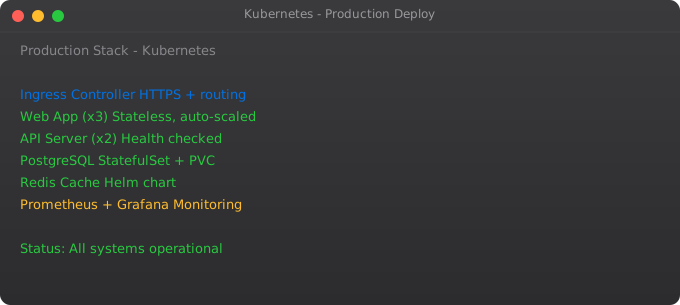
Our production deployment has these components. A frontend service: a Node.js API, 3 replicas, with readiness and liveness probes, resource limits, and HPA. A PostgreSQL database: single replica with persistent storage via PVC. A Redis cache: in-memory, 2 replicas. An Ingress: routing /api to the backend, handling HTTPS with cert-manager. A namespace with ResourceQuota. Monitoring via Prometheus. All packaged as a Helm chart.
Step 1 — Create the Production Namespace with Quotas
apiVersion: v1
kind: Namespace
metadata:
  name: production
  labels:
    env: production
---
apiVersion: v1
kind: ResourceQuota
metadata:
  name: production-quota
  namespace: production
spec:
  hard:
    requests.cpu: "8"
    requests.memory: 16Gi
    limits.cpu: "16"
    limits.memory: 32Gi
    pods: "50"
    services: "20"
---
apiVersion: v1
kind: LimitRange
metadata:
  name: production-limits
  namespace: production
spec:
  limits:
  - type: Container
    defaultRequest:
      cpu: 100m
      memory: 128Mi
    default:
      cpu: 500m
      memory: 256Mi
    max:
      cpu: "4"
      memory: 8Gi
Step 2 — Secrets and ConfigMaps
# Create database credentials secret
kubectl create secret generic db-credentials \
  --from-literal=POSTGRES_PASSWORD=strongpassword123 \
  --from-literal=POSTGRES_USER=appuser \
  --from-literal=POSTGRES_DB=myapp \
  -n production

# Create app secrets
kubectl create secret generic app-secrets \
  --from-literal=JWT_SECRET=supersecretjwtkey \
  --from-literal=SESSION_SECRET=sessionkey \
-n productionapiVersion: v1
kind: ConfigMap
metadata:
name: app-config
namespace: production
data:
APP_ENV: "production"
LOG_LEVEL: "warn"
DB_HOST: "postgres-service"
DB_PORT: "5432"
REDIS_HOST: "redis-service"
REDIS_PORT: "6379"
PORT: "3000"Step 3 — PostgreSQL with Persistent Storage
apiVersion: v1
kind: PersistentVolumeClaim
metadata:
  name: postgres-pvc
  namespace: production
spec:
  accessModes:
    - ReadWriteOnce
  resources:
    requests:
      storage: 20Gi
---
apiVersion: apps/v1
kind: Deployment
metadata:
  name: postgres
  namespace: production
spec:
  replicas: 1
  selector:
    matchLabels:
      app: postgres
  template:
    metadata:
      labels:
        app: postgres
    spec:
      containers:
      - name: postgres
        image: postgres:15
        envFrom:
        - secretRef:
            name: db-credentials
        ports:
        - containerPort: 5432
        resources:
          requests:
            cpu: 200m
            memory: 256Mi
          limits:
            cpu: "1"
            memory: 1Gi
        readinessProbe:
          exec:
            command: ["pg_isready", "-U", "appuser", "-d", "myapp"]
          initialDelaySeconds: 10
          periodSeconds: 5
        livenessProbe:
          exec:
            command: ["pg_isready", "-U", "appuser"]
          initialDelaySeconds: 30
          periodSeconds: 10
        volumeMounts:
        - name: postgres-data
          mountPath: /var/lib/postgresql/data
      volumes:
      - name: postgres-data
        persistentVolumeClaim:
          claimName: postgres-pvc
---
apiVersion: v1
kind: Service
metadata:
  name: postgres-service
  namespace: production
spec:
  selector:
    app: postgres
  ports:
  - port: 5432
    targetPort: 5432
Step 4 — The Application Deployment with Full Production Config
apiVersion: apps/v1
kind: Deployment
metadata:
  name: myapp
  namespace: production
  annotations:
    kubernetes.io/change-cause: "Release v2.1.0 - performance improvements"
spec:
  replicas: 3
  strategy:
    type: RollingUpdate
    rollingUpdate:
      maxSurge: 1
      maxUnavailable: 0      # Never go below 3 pods during updates
  selector:
    matchLabels:
      app: myapp
  template:
    metadata:
      labels:
        app: myapp
        version: "2.1.0"
    spec:
      terminationGracePeriodSeconds: 60    # Give pods 60s to finish requests
      containers:
      - name: myapp
        image: myapp:2.1.0
        ports:
        - containerPort: 3000
        envFrom:
        - configMapRef:
            name: app-config
        - secretRef:
            name: app-secrets
        env:
        - name: POSTGRES_PASSWORD
          valueFrom:
            secretKeyRef:
              name: db-credentials
              key: POSTGRES_PASSWORD
        resources:
          requests:
            cpu: 200m
            memory: 256Mi
          limits:
            cpu: "1"
            memory: 512Mi
        startupProbe:
          httpGet:
            path: /health
            port: 3000
          failureThreshold: 20
          periodSeconds: 5
        readinessProbe:
          httpGet:
            path: /health/ready
            port: 3000
          initialDelaySeconds: 5
          periodSeconds: 5
          failureThreshold: 3
        livenessProbe:
          httpGet:
            path: /health/live
            port: 3000
          initialDelaySeconds: 30
          periodSeconds: 10
          failureThreshold: 3
---
apiVersion: v1
kind: Service
metadata:
  name: myapp-service
  namespace: production
spec:
  selector:
    app: myapp
  ports:
  - port: 80
    targetPort: 3000
Step 5 — Ingress with Automatic HTTPS
apiVersion: networking.k8s.io/v1
kind: Ingress
metadata:
  name: production-ingress
  namespace: production
  annotations:
    cert-manager.io/cluster-issuer: "letsencrypt-prod"
    nginx.ingress.kubernetes.io/ssl-redirect: "true"
    nginx.ingress.kubernetes.io/proxy-read-timeout: "300"
    nginx.ingress.kubernetes.io/proxy-body-size: "10m"
spec:
  ingressClassName: nginx
  tls:
  - hosts:
    - api.yourdomain.com
    secretName: production-tls
  rules:
  - host: api.yourdomain.com
    http:
      paths:
      - path: /
        pathType: Prefix
        backend:
          service:
            name: myapp-service
            port:
              number: 80
Step 6 — Horizontal Pod Autoscaler
apiVersion: autoscaling/v2
kind: HorizontalPodAutoscaler
metadata:
  name: myapp-hpa
  namespace: production
spec:
  scaleTargetRef:
    apiVersion: apps/v1
    kind: Deployment
    name: myapp
  minReplicas: 3
  maxReplicas: 20
  metrics:
  - type: Resource
    resource:
      name: cpu
      target:
        type: Utilization
        averageUtilization: 70
  - type: Resource
    resource:
      name: memory
      target:
        type: Utilization
        averageUtilization: 80
  behavior:
    scaleDown:
      stabilizationWindowSeconds: 300    # Wait 5 min before scaling down
    scaleUp:
      stabilizationWindowSeconds: 60     # Scale up after 1 min of high load
Step 7 — PodDisruptionBudget for High Availability
apiVersion: policy/v1
kind: PodDisruptionBudget
metadata:
  name: myapp-pdb
  namespace: production
spec:
  minAvailable: 2    # Always keep at least 2 pods running even during node drains
  selector:
    matchLabels:
      app: myapp
Step 8 — Deploy Everything
# Apply in order
kubectl apply -f production-namespace.yaml
kubectl apply -f app-config.yaml
kubectl apply -f postgres.yaml

# Wait for postgres to be ready
kubectl rollout status deployment/postgres -n production

# Deploy the app
kubectl apply -f app-deployment.yaml
kubectl apply -f production-ingress.yaml
kubectl apply -f hpa.yaml
kubectl apply -f pdb.yaml

# Verify everything
kubectl get all -n production
kubectl get ingress -n production
kubectl get hpa -n production
Step 9 — Verify the Production Deployment
# Are all pods running?
kubectl get pods -n production

# Are all pods passing readiness checks?
kubectl get pods -n production -o wide | grep -v Running

# Check restart counts (should be 0 for fresh deploy)
kubectl get pods -n production

# Watch HPA — does it have metrics?
kubectl get hpa -n production

# Test your endpoint
curl -I https://api.yourdomain.com/health

# Trigger a rolling update
kubectl set image deployment/myapp myapp=myapp:2.2.0 -n production
kubectl rollout status deployment/myapp -n production

# Emergency rollback if needed
kubectl rollout undo deployment/myapp -n production
Production Checklist
Before you consider a Kubernetes deployment truly production-ready, verify each of these items. Every container has resource requests and limits set. Every Deployment has readiness and liveness probes. A PodDisruptionBudget protects your minimum replica count. Secrets are not stored in Git raw. Monitoring is set up and you have at least one alert configured. You have tested a rolling update and verified zero downtime. You have tested a rollback and verified it works. Logs are centralised and searchable. The deployment is in a Helm chart so it is fully repeatable.
What You Have Learned in This Series
Over twelve parts, you went from "what is Kubernetes" to deploying a fully production-grade application. You understand pods, deployments, services, networking, storage, configuration management, ingress with HTTPS, health probes, resource management, Helm, and monitoring. These are not beginner topics — these are the same concepts used by engineers at companies running Kubernetes at massive scale.
The gap between knowing Kubernetes and being confident with it closes fast once you start running real workloads. Set up your own project, deploy something you actually use, and break things on purpose. See how rolling updates behave under load. Delete a pod and watch self-healing work. Trigger an HPA scale event. Nothing teaches faster than real incidents in a cluster you own.
From here, the natural next steps are learning RBAC and security hardening, exploring GitOps with ArgoCD or Flux, understanding cluster autoscaling for nodes (not just pods), and diving deeper into service mesh with Istio or Linkerd. Each of those could be its own 12-part series.
Frequently Asked Questions
What does a production-grade Kubernetes deployment include?
Resource requests and limits, liveness and readiness probes, Ingress with HTTPS, Secrets for sensitive config, PVCs for stateful data, HPA for autoscaling, PodDisruptionBudgets for availability, and monitoring via Prometheus. All packaged in a Helm chart for repeatability.
What are the most important resource management best practices?
Always set requests AND limits on every container. Use LimitRanges to enforce defaults per namespace. Use ResourceQuotas to cap total namespace consumption. Set maxUnavailable: 0 in your rolling update strategy so capacity never drops during deploys.
How do I achieve zero-downtime deployments?
Configure readiness probes so traffic only reaches ready pods. Set maxUnavailable: 0 and maxSurge: 1 in your Deployment strategy. Set terminationGracePeriodSeconds so pods finish in-flight requests before dying. Use PodDisruptionBudgets to protect minimum availability.
What is the recommended secret management approach?
Never commit raw Secret YAML to Git. Use External Secrets Operator to pull from AWS Secrets Manager or Vault, or use Sealed Secrets for GitOps workflows. Regular Kubernetes Secrets are fine for non-production with strict RBAC.
How long does it take to get production-ready?
Core setup takes 1–2 days. Operational maturity — tuned resource limits, proper alerting, runbooks, chaos testing — takes weeks of running real workloads and learning from real incidents. Start simple and iterate.
Key takeaways
- The capstone ties the last 11 parts together: a multi-service app with proper deployments, services, ingress, autoscaling, secrets, and monitoring.
- Build this even if you've read every part — reading K8s and doing K8s are very different skills.
- Once this works, you're in the top percentile of "can deploy to Kubernetes" — most candidates I interview can't get this far end-to-end.
- Next natural step: GitOps with ArgoCD/Flux, plus learning a managed K8s flavour (EKS/GKE/AKS). That's where the DevOps roadmap series continues.