
Kubernetes Tutorial — Part 3: Deployments, ReplicaSets, and Self-Healing
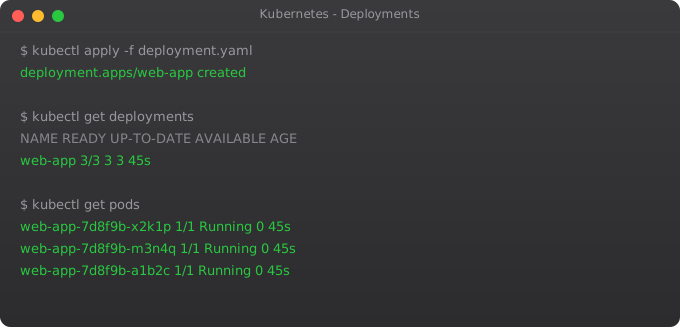
In Part 2, we ran a pod directly using kubectl run. That works fine for experimenting, but it is not how real applications are deployed. The problem is simple: if that pod crashes, it is gone. Kubernetes does not restart it. You would have to manually run the command again. In production, this is completely unacceptable.
This is where Deployments come in. A Deployment is the proper, production-grade way to run applications in Kubernetes. It tells Kubernetes exactly how many copies of your application you want running, and Kubernetes continuously ensures that number is maintained — automatically, without you doing anything. A pod crashes at 3am? Kubernetes spins up a replacement before you even wake up. This is what people mean when they say Kubernetes is "self-healing."
Understanding Deployments is probably the most important step in learning Kubernetes. Everything else builds on this concept. So let us go deep.
The Hierarchy: Deployment → ReplicaSet → Pod
Kubernetes has a three-layer hierarchy for running applications. At the bottom are Pods — the actual running containers. Above that are ReplicaSets — objects that ensure a specified number of pod replicas are always running. At the top are Deployments — which manage ReplicaSets and add the ability to do updates and rollbacks.
When you create a Deployment, Kubernetes automatically creates a ReplicaSet, and the ReplicaSet creates the Pods. You mostly interact with Deployments directly and let Kubernetes manage the layers below. But understanding this hierarchy helps you debug problems when they occur.
Your First Deployment
There are two ways to create Kubernetes objects: imperatively (using CLI flags) and declaratively (using YAML files). For learning, the imperative style is faster. For production, always use YAML files because they can be versioned in Git. We will do both.
# Create a deployment with 3 replicas
kubectl create deployment my-app --image=nginx --replicas=3

# Check the deployment
kubectl get deployments

# Check the pods it created
kubectl get pods

# See the ReplicaSet it created
kubectl get replicasets
Run kubectl get pods and you should see three pods running, all with names starting with "my-app-". Now do something destructive: manually delete one of those pods.
# Get pod names
kubectl get pods

# Delete one pod (replace with your actual pod name)
kubectl delete pod my-app-6d9b8c7f5-xk2mn

# Immediately watch what happens
kubectl get pods -w
Watch the output. Within seconds, Kubernetes detects that there are now only 2 pods running instead of the 3 you specified. The ReplicaSet controller creates a new pod immediately. The -w flag means "watch" — it streams updates in real time. You can see the new pod go from "Pending" to "ContainerCreating" to "Running" right in front of you. This is self-healing in action.
Deployments Using YAML Files
YAML files are how you define everything in Kubernetes declaratively. They are readable, versionable, and repeatable. In real teams, nobody types kubectl create commands manually — they write YAML files, commit them to Git, and apply them to the cluster.
apiVersion: apps/v1
kind: Deployment
metadata:
  name: nginx-deployment
  labels:
    app: nginx
spec:
  replicas: 3
  selector:
    matchLabels:
      app: nginx
  template:
    metadata:
      labels:
        app: nginx
    spec:
      containers:
      - name: nginx
        image: nginx:1.25
        ports:
        - containerPort: 80
        resources:
          requests:
            memory: "64Mi"
            cpu: "100m"
          limits:
            memory: "128Mi"
            cpu: "200m"
Let me explain the key fields. replicas: 3 means you always want 3 pods running. The selector.matchLabels tells the Deployment which pods it is responsible for — it manages any pod with the label app: nginx. The template section defines what each pod should look like. The resources section sets CPU and memory limits — this is important for production because without limits, a single pod can consume all resources on a node and starve other pods.
# Apply the deployment
kubectl apply -f nginx-deployment.yaml

# Check it
kubectl get deployments
kubectl get pods

# Describe for full details
kubectl describe deployment nginx-deployment
Scaling a Deployment
One of the biggest advantages of Kubernetes is how easy it is to scale. Traffic spiking? Scale up. Traffic slow? Scale down to save resources. You can do this in seconds.
# Scale up to 5 replicas
kubectl scale deployment nginx-deployment --replicas=5

# Watch the new pods appear
kubectl get pods -w

# Scale back down to 2
kubectl scale deployment nginx-deployment --replicas=2

# Watch pods terminate
kubectl get pods -w
When you scale down, Kubernetes does not randomly kill pods. It terminates pods gracefully — sending them a SIGTERM signal, giving them time to finish handling current requests, then forcefully terminating them after the grace period. This prevents dropped requests during scale-down operations.
Performing a Rolling Update
This is the part that used to require complex scripts and maintenance windows before Kubernetes. Updating your application with zero downtime is built in by default.
Let us update the nginx version from 1.25 to 1.27 and watch how Kubernetes handles it.
# Update the container image
kubectl set image deployment/nginx-deployment nginx=nginx:1.27

# Watch the rollout in real time
kubectl rollout status deployment/nginx-deployment

# See the history of rollouts
kubectl rollout history deployment/nginx-deployment
During a rolling update, Kubernetes creates new pods with the updated image one at a time, waits for each new pod to become ready, then terminates one old pod. At no point does your deployment go to zero replicas. Your users experience zero downtime.
Rolling Back a Bad Deployment
What if the new version has a bug? Kubernetes makes rollback instant.
# Roll back to previous version
kubectl rollout undo deployment/nginx-deployment

# Roll back to a specific revision
kubectl rollout undo deployment/nginx-deployment --to-revision=1

# Check current status after rollback
kubectl rollout status deployment/nginx-deployment
I have used rollback in real production scenarios multiple times. The fact that you can go from a broken deployment back to the last working state in a single command, with automatic zero-downtime switching, is genuinely one of the best features in Kubernetes.
Understanding Update Strategies
Kubernetes supports two deployment update strategies. The default is RollingUpdate, which we just used — it replaces pods gradually. The other is Recreate — which terminates all old pods first, then creates new ones. Recreate causes downtime but is useful when your application cannot run two different versions simultaneously (for example, when a database schema change requires all old instances to stop first).
spec:
  strategy:
    type: RollingUpdate
    rollingUpdate:
      maxSurge: 1        # Allow 1 extra pod during update
      maxUnavailable: 0  # Never go below desired replica count
With maxUnavailable: 0 and maxSurge: 1, Kubernetes always maintains the full replica count during updates, briefly running one extra pod. This is the safest configuration for production applications where you cannot afford any drop in capacity.
Cleaning Up
# Delete deployment (also deletes its ReplicaSets and Pods)
kubectl delete deployment nginx-deployment

# Verify everything is gone
kubectl get pods
kubectl get replicasets
When you delete a Deployment, Kubernetes automatically cleans up the ReplicaSets and Pods it manages. This cascading deletion is another reason to always use Deployments instead of creating Pods directly.
What is Next
You now understand the most important concept in Kubernetes: Deployments. You know how to create them, scale them, update them, and roll them back. You have seen self-healing work in real time.
But there is a problem with what we have so far. The pods in our deployment have IP addresses that change every time a pod is recreated. If you have a frontend pod that needs to talk to a backend pod, how does it know where to send requests? That is exactly what Part 4 on Services and Networking covers. Services give your pods a stable address that never changes, even as the pods behind it are replaced. That is the next piece of the puzzle.
Frequently Asked Questions
What is the difference between a Pod and a Deployment?
A Pod is a single running instance — if it crashes, it stays dead. A Deployment manages pods and ensures your desired number always runs. If a pod dies, the Deployment recreates it automatically. Always use Deployments in production, never bare pods.
What is a ReplicaSet?
A ReplicaSet maintains a stable number of pod replicas running at any time. Deployments automatically create and manage ReplicaSets — you rarely interact with them directly. They are the engine that powers the self-healing behavior.
How does Kubernetes self-healing actually work?
Kubernetes continuously compares the current state of the cluster with your desired state. If a pod crashes, the controller manager detects the mismatch and schedules a new pod. This happens automatically within seconds, no human involvement needed.
How do I do a zero-downtime update?
The default RollingUpdate strategy handles this automatically. Update the container image with kubectl set image and Kubernetes gradually replaces old pods with new ones while maintaining availability throughout.
How do I roll back a bad deployment?
Run kubectl rollout undo deployment/your-deployment-name. Kubernetes instantly switches back to the previous ReplicaSet. The entire rollback takes seconds and causes zero downtime.
Key takeaways
- A pod is one or more containers that share networking and storage. Most pods are one container — multi-container pods are for sidecars and helpers.
- Pods are mortal. They get killed, recreated, rescheduled. Never assume a pod's IP or name is stable.
- If you find yourself running raw pods in production, you're doing it wrong. Use Deployments or StatefulSets instead — they manage pods for you.
- Labels are the glue of K8s. Pods get labels, selectors use labels, everything else (services, deployments) finds pods through labels.