
Docker Full Tutorial — Part 2: Installation & First Containers
Installing Docker for the first time feels like a small thing, but the moment you type docker run hello-world and it works — something clicks. You just pulled an image from the internet, Kubernetes ran it as a container, it printed a message, and then it disappeared cleanly. No installation, no dependencies, no cleanup. Just: pull, run, done.
That is what Docker does to every application. In this part, we will install Docker, understand the architecture behind it, run several containers, and learn the core commands you will use every single day as a developer or DevOps engineer.
Installing Docker on Ubuntu/Linux
# Remove any old Docker versions
sudo apt remove docker docker-engine docker.io containerd runc

# Install prerequisites
sudo apt update
sudo apt install ca-certificates curl gnupg lsb-release

# Add Docker's GPG key
sudo mkdir -p /etc/apt/keyrings
curl -fsSL https://download.docker.com/linux/ubuntu/gpg | sudo gpg --dearmor -o /etc/apt/keyrings/docker.gpg

# Add Docker repository
echo "deb [arch=$(dpkg --print-architecture) signed-by=/etc/apt/keyrings/docker.gpg] https://download.docker.com/linux/ubuntu $(lsb_release -cs) stable" | sudo tee /etc/apt/sources.list.d/docker.list

# Install Docker
sudo apt update
sudo apt install docker-ce docker-ce-cli containerd.io docker-compose-plugin

# Run Docker without sudo
sudo usermod -aG docker $USER
newgrp docker

# Verify
docker --version
docker run hello-world
Installing Docker on macOS and Windows
On macOS and Windows, the easiest path is Docker Desktop — a GUI application that installs Docker Engine, Docker CLI, and Docker Compose together.
Download Docker Desktop from docker.com/products/docker-desktop and run the installer. On macOS with Apple Silicon (M1/M2/M3), download the Apple Silicon version specifically — it runs containers natively without Rosetta emulation. On Windows, enable WSL 2 integration in Docker Desktop settings for best performance.
docker --version
docker compose version
docker run hello-world
Understanding the Docker Architecture
Docker uses a client-server architecture. The Docker client is the docker command you type in your terminal. The Docker daemon (dockerd) is a background service that does the actual work — building images, running containers, managing networks and volumes. The client communicates with the daemon via a REST API over a Unix socket or TCP.
When you type docker run nginx, the client sends that instruction to the daemon. The daemon checks if the nginx image is available locally. If not, it pulls it from Docker Hub. Then it creates a container from that image and starts it. All of this happens in the daemon — the client just sends the instruction and displays the response.
sudo systemctl status docker   # Linux
docker info                    # Shows daemon info on any platform
Running Your First Real Containers
# Run nginx web server in the background
docker run -d -p 8080:80 --name my-nginx nginx
# -d = detached (runs in background)
# -p 8080:80 = map host port 8080 to container port 80
# --name = give it a memorable name

# Open http://localhost:8080 in browser - nginx welcome page

# Run an interactive Ubuntu container
docker run -it ubuntu bash
# -i = interactive, -t = allocate pseudo-TTY
# Type 'exit' to leave the container

# Run a one-off command and delete the container after
docker run --rm ubuntu echo "Hello from inside a container"
# --rm = remove container after it exits

# Run PostgreSQL database
docker run -d   --name my-postgres   -e POSTGRES_PASSWORD=mypassword   -e POSTGRES_DB=testdb   -p 5432:5432   postgres:15
Essential Docker Commands
# List running containers
docker ps

# List ALL containers (including stopped)
docker ps -a

# View logs from a container
docker logs my-nginx
docker logs my-nginx -f     # Follow/stream logs

# Execute a command inside running container
docker exec -it my-nginx bash
docker exec my-nginx cat /etc/nginx/nginx.conf

# Stop a container (graceful - sends SIGTERM first)
docker stop my-nginx

# Kill a container (immediate - SIGKILL)
docker kill my-nginx

# Remove a stopped container
docker rm my-nginx

# Remove a running container forcefully
docker rm -f my-nginx

# List downloaded images
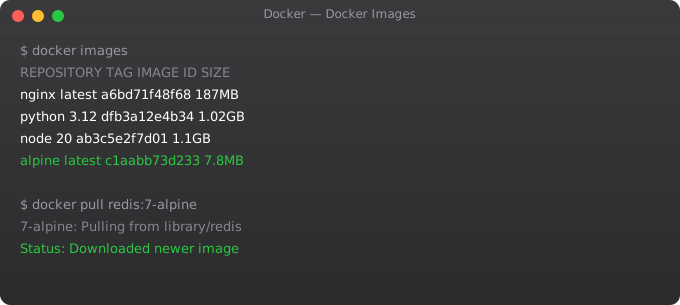
docker images

# Remove an image
docker rmi nginx

# Pull an image without running it
docker pull ubuntu:22.04

# See disk usage by Docker
docker system df

# Remove all stopped containers, unused images, dangling volumes
docker system prune -a
You now have Docker installed and working. You understand the client-daemon architecture and you know the core commands. In Part 3, we write Dockerfiles — the key skill that lets you containerize your own applications. Writing good Dockerfiles is the difference between Docker images that are 2GB and take 10 minutes to build, and images that are 150MB and build in under 60 seconds.
Frequently Asked Questions
How do I run a Docker container in the background?
Use the -d flag (detached mode): docker run -d nginx. The container runs in the background and Docker prints the container ID. Use docker ps to see running containers and docker logs container-name to view their output.
How do I access a web server running inside a Docker container?
Use port mapping with the -p flag: docker run -d -p 8080:80 nginx maps host port 8080 to container port 80. Open http://localhost:8080 in your browser. The format is -p HOST_PORT:CONTAINER_PORT.
Why does Docker need sudo on Linux?
The Docker daemon runs as root and the Docker socket is owned by root. Adding your user to the docker group (sudo usermod -aG docker $USER) lets you run Docker commands without sudo. Always log out and back in or run newgrp docker after adding yourself to the group.
What is the difference between docker stop and docker kill?
docker stop sends SIGTERM to the container's main process, giving it time to clean up gracefully, then SIGKILL after 10 seconds. docker kill sends SIGKILL immediately with no grace period. Always prefer docker stop unless the container is unresponsive.
How do I remove all unused Docker resources to free disk space?
Run docker system prune -a. This removes all stopped containers, unused images, dangling volumes, and build cache. Docker can accumulate gigabytes of unused data over time. Check current usage with docker system df before pruning.
Key takeaways
- The Docker daemon is the actual engine; the docker CLI is just a client talking to it. That's why you sometimes need sudo or to be in the docker group.
- `docker run` does three things at once: pull the image (if missing), create a container, and start it. Knowing this helps when you're debugging slow runs.
- Forgetting `--rm` will leave stopped containers piling up on your system. Use `docker ps -a` regularly to see what's lying around.
- Always pin image versions with tags. `nginx:latest` today is not the same as `nginx:latest` six months from now — that bites people in production.